Cutover Template from the Book (for MS Project and Excel)
Presented by Dr. Tortuga

Organize your cutover activities and create your cutover schedule iteratively
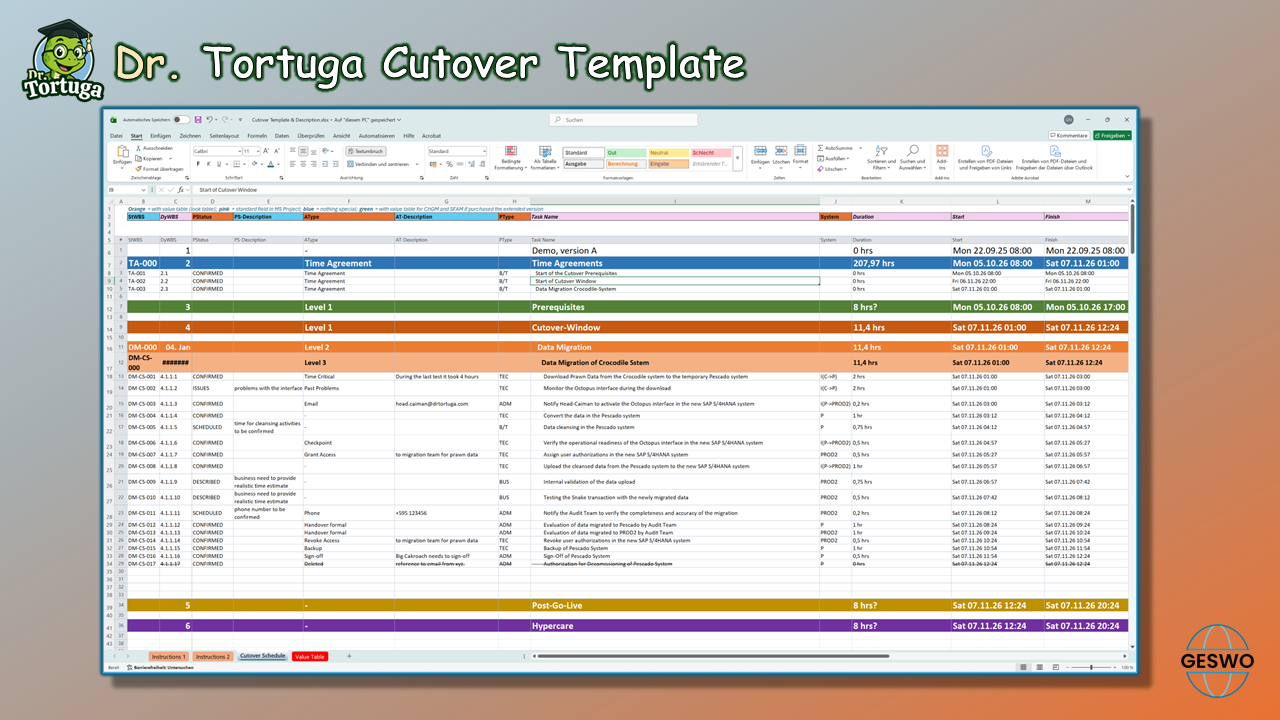
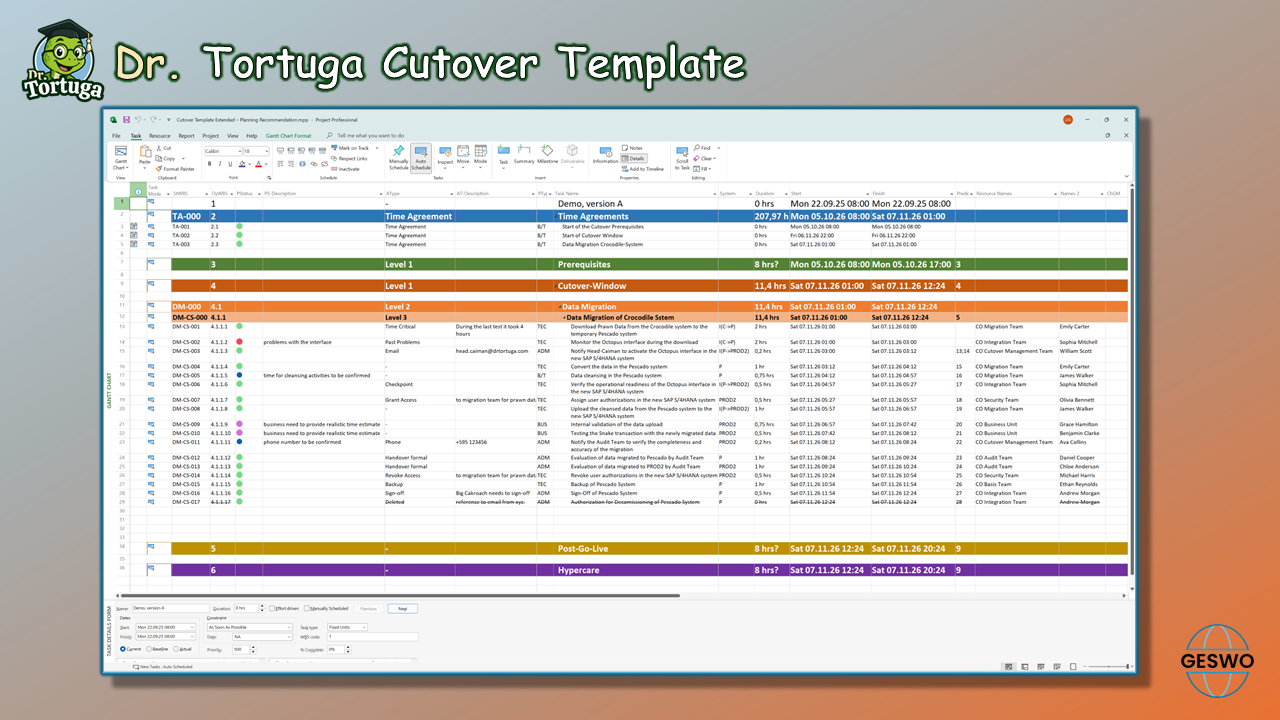
You will receive the cutover template described in the book “SAP Cutover Management” for MS Project and Excel, complete with all pre-populated value tables. MS Project is required for iterative duration-based scheduling—that is, for creating your cutover schedule. The Excel file contains the same value tables and fields as MS Project and is intended solely for compiling cutover activities. Duration-based scheduling is not possible in Excel. The Excel file is particularly useful for companies that wish to purchase only a limited number of MS Project licenses.
The template is designed for project managers, SAP cutover teams, consultants, PMOs, and IT managers. It saves time, reduces stress, standardizes planning, minimizes errors, and is fully audit-compliant.
Available now, from 49 €.
See all licenses and versions below.
Training Video on the Cutover Template (40 minutes)
In this 40-minute training session, Dr. Tortuga provides a step-by-step guide on how to use the cutover template—from planning and preparation through to the execution of a complete cutover. The video explains all fields and columns of the template in detail and uses practical examples to demonstrate how the template is applied in real-world projects.
What is a Cutover Template?
The cutover template is a predefined layout for the cutover schedule and establishes the structure in which all technical and operational activities related to the go-live are documented. While the cutover schedule describes the chronological sequence of activities and thus forms the core of cutover preparation, the template focuses exclusively on the form and format of the documentation. It specifies how activities are documented, assigned, and presented to create a uniform basis for resource allocation, coordination, and escalation logic.
What is the difference between a cutover plan or cutover schedule and a project plan?
Level of Detail in a Cutover Schedule
Unlike the comprehensive cutover plan, which also covers governance aspects, roles, and risk mitigation, the template is purely process-oriented. Before the cutover activities are actually documented, the template must be coordinated with all stakeholders and formally approved. This ensures that the planning is consistent, responsibilities are clearly documented, and the subsequent implementation is traceable in an audit-compliant environment.
A cutover schedule differs fundamentally from a conventional project schedule. While a project schedule is typically created on a daily or weekly basis and assumes an 8-hour workday, a cutover schedule is often based on a 24-hour calendar. It also takes into account activities at night and on weekends, since the go-live often takes place outside of normal business hours.
The level of detail in the cutover schedule is intentionally limited:
Typically, three to a maximum of four levels are used
Level 1 – Strategic level (release strategy / streamline)
Level 2 – Structural level (building blocks)
Level 3 – Operational level (detailed activities)
Level 4 – only in exceptional cases
Level 3 lists the individual activities. Sub-activities at a fourth level are used only when absolutely necessary in specific cases. At Level 3, these are then highlighted in color so that it is impossible to overlook the fact that sub-activities still exist here. This simplification serves to improve clarity and operational manageability. In contrast, a traditional project plan allows for a structure of any depth, often featuring complex work breakdown structures (WBS) and extensive subtasks.
Column Structure of a Cutover Schedule
The column structure also differs significantly. The cutover plan focuses on time windows, activity descriptions, responsible roles, contingency options, and status. Governance elements such as approval workflows or escalation logic are an integral part of it. A project schedule, on the other hand, typically includes tasks, start and end dates, resources, dependencies, and progress indicators—with a focus on budget, deliverables, and tracking milestones.
Visually, the cutover schedule is usually represented as a linear sequence matrix or a Gantt chart with time blocks. It is often updated in near real time, as operating conditions can change on short notice. The project schedule, on the other hand, is more stable and is updated at longer intervals.
Although tools such as MS Project can be used for both schedules, the cutover schedule requires methodological adjustments—for example, through specific calendar logic, a reduced level of detail, and a different filtering and visualization strategy. This makes it clear that the cutover schedule is not a simplified version of the project schedule, but rather a standalone management tool for the operational go-live. It is essential to avoid mixing the two!
The cutover template plays a central role in the go-live strategy. It defines the structure used to plan, visualize, and manage cutover activities—typically in MS Project or a comparable tool.
The individual columns of the template reflect the methodological logic used to map technical tasks, role responsibilities, time windows, and fallback options. Unlike a conventional project plan, the cutover template focuses on the operational go-live and uses a reduced level of planning detail as well as a 24-hour calendar.
Ideally, the template is created during a dedicated workshop in which the structure is agreed upon with the relevant stakeholders. During this process, not only are the columns—e.g., task description, start/end time, responsible role, status, fallback—defined, but also the filter logic, grouping, and visualization rules. The template then serves as the basis for the cutover schedule and is embedded in the overall strategy: It combines scenario logic, resource management, and governance requirements into a consistent process model. The cutover template defines how cutover activities are structured and documented—both in terms of content and timing.
The image below shows the cutover template in Excel
The image below shows the cutover template in MS Project
Create your cutover schedule using this template and bring order to your cutover activities
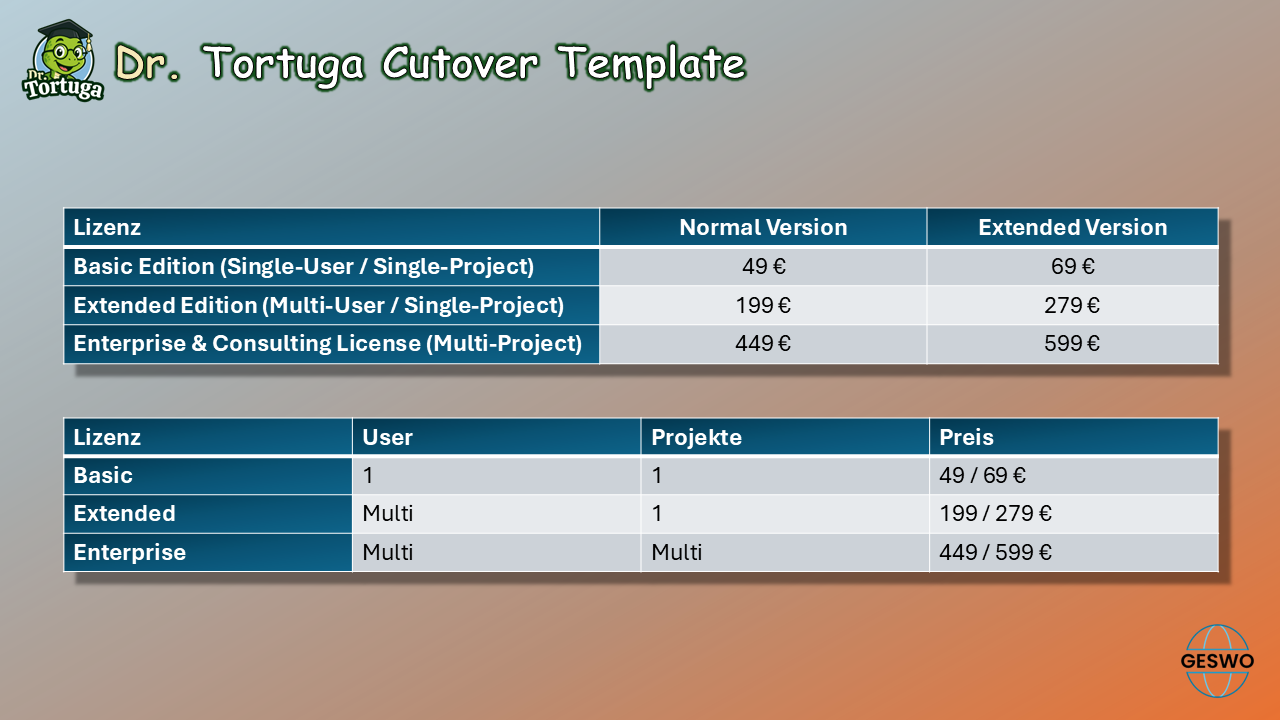
The cutover template is available in two versions: Normal and Extended. The extended version includes additional columns from the ChGM™ (Change Governance Matrix) and SFAM™ (Functional Assignment Matrix for SAP®).
Both versions are available in all three licensing models.
1. Basic Edition (Single-User / Single-Project):
Valid for one (1) named user on one (1) specific IT project. Redistribution or use across multiple clients or projects is strictly prohibited.
2. Extended Edition (Multi-User / Single-Project):
Valid for the entire project team within one (1) specific IT project. The template may be freely shared among the project members of this specific deployment.
3. Enterprise & Consulting License (Multi-Project):
Required for freelance consultants, consulting firms, or enterprises using the templates across multiple clients, deployments, or separate projects.
The image below shows the licensing model